The Modern Startup Stack

Choosing a web framework is like choosing your first pokémon.
I didn’t want to succumb to the ‘new hotness’ problem with the myriad of JS frameworks to choose from (Angular, Vue, React, Solid). I wanted something that i can choose and stick to for atleast a decade. So I resorted to a Rails monolith for building apps (but with a slight twist)
To start with, I chose Ruby on Rails. It’s a Lindy-compatible web framework that’s mature, stable, and well documented. It’s been around for over 20 years, built on a language that’s been around for over 30 years.
I was prompted to take the Ruby on Rails red pill through a recent talk by Irina Nazarova for the RailsConf keynote.
Although Ruby on Rails was touted as a great framework for a solo developer, it still missed the reactive-component jazz. React made complex UI possible. In fact, the #1 request from young Rails startups was the need for proper React support in the Rails community.
React and other reactive frameworks excel at building highly interactive user interfaces (UIs). Not just that, there are some killer libraries which I could only find in the react ecosystem such as framer-motion, svelte-motion etc
Surprisingly, there was a solution to bridge the gap between Rails and React. Inertia.js served as that bridge, seamlessly integrating traditional Rails templates with reactive frameworks like React, Vue, and Svelte.
In fact 90% of the UI can be done on Rails and Hotwire. And the reactive frameworks could be used to selectively sprinkle on top of Rails for more complex UI requirements. What sort of reactive framework should I choose then? React, Vue, Svelte, Angular?
My primary considerations were code simplicity, readability, and community support. Performance mattered, but it wasn’t the sole determinant. Google Trends provided a snapshot of each framework’s popularity and adoption rates, helping me gauge their standing in the developer community.
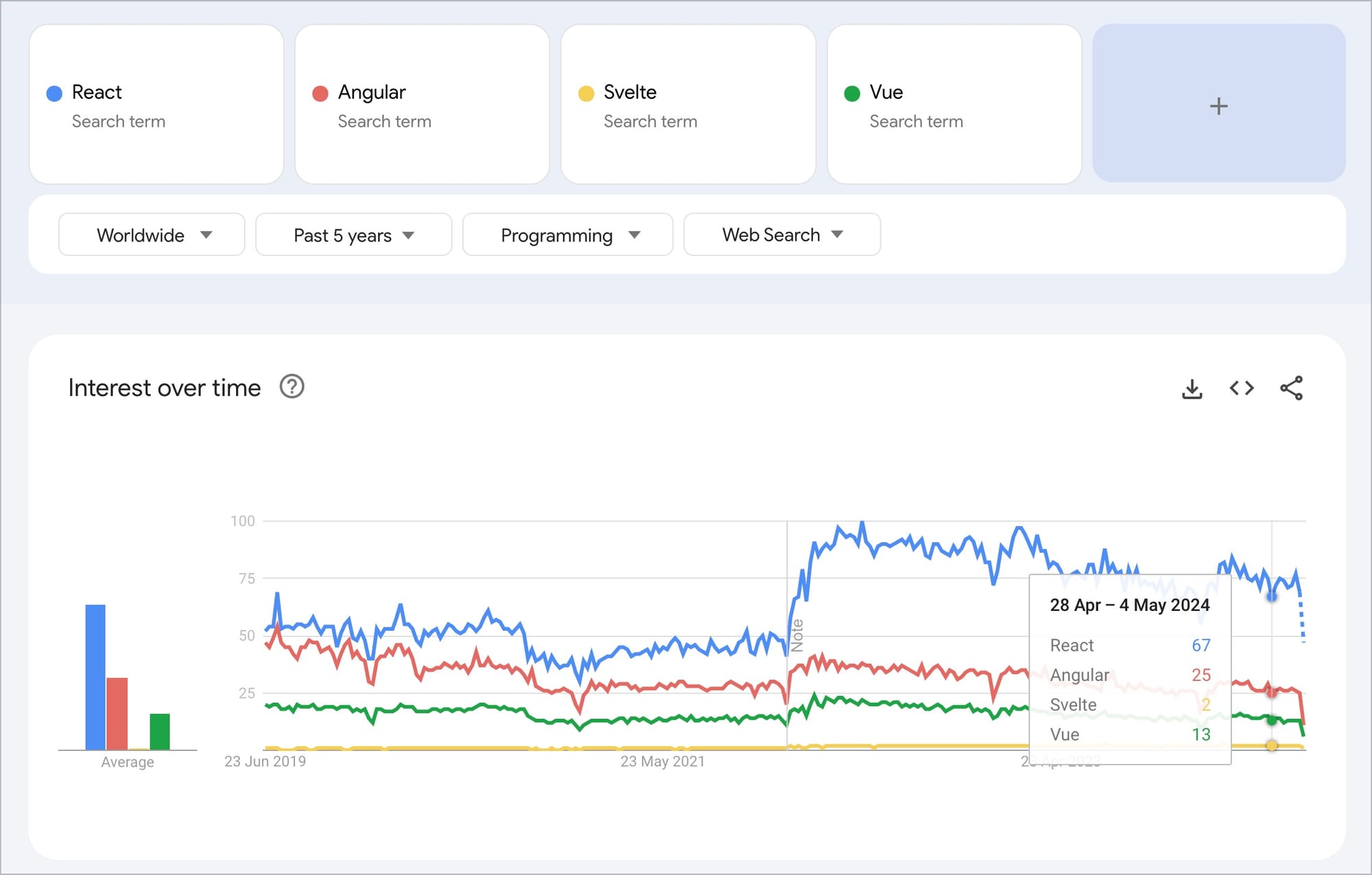
React continues to capture the lion’s share of attention, whereas Svelte remains obscure, hippie and unnoticed
Svelte tipped the fence for me, owing to their focus on simplicity, more than performance. It’s just like React or Vue, but it’s a compiler.
Svelte generates highly optimized JavaScript code, resulting in faster load times and a smaller bundle size. With Svelte, you only ship the code that your app needs, reducing the initial load time significantly.
Svelte was like Rails for the front end (low barrier of entry, sensible defaults etc) and I wanted to get the two working together. I also wanted to use Inertia which is a sort of ‘glue’ between your front and backend that allows you to use standard controllers without having to write an API.
Svelte’s Tutorial Website is top tier
The way that Svelte has structured their tutorial website and documentation is top tier. When you go to their tutorial page it greets you with some instructions on the left and an IDE on the right. I liked the attention to detail in the tutorials. They even didn’t allow visitors to copy-paste code onto the IDE on the right as they wanted visitors to manually type down the code for better retention. I just fell in love with this tutorial page :)
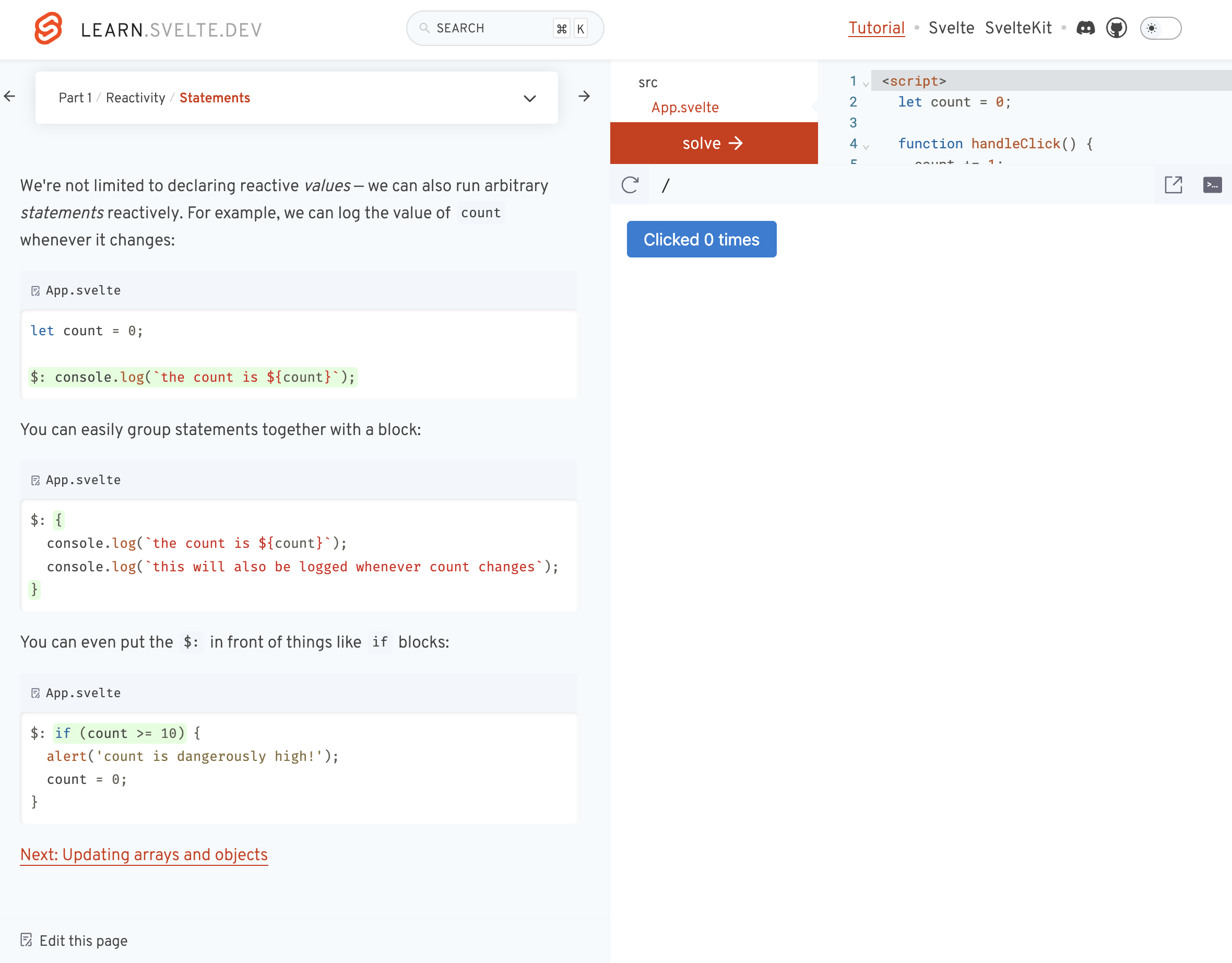
Their tutorial series consists of 4 parts with each having different lessons all separated by categories.
React also has a tutorial on their website. In no way is that tutorial better than Svelte’s. React has structured their tutorial through documentation rather than an interactive layout like Svelte’s.
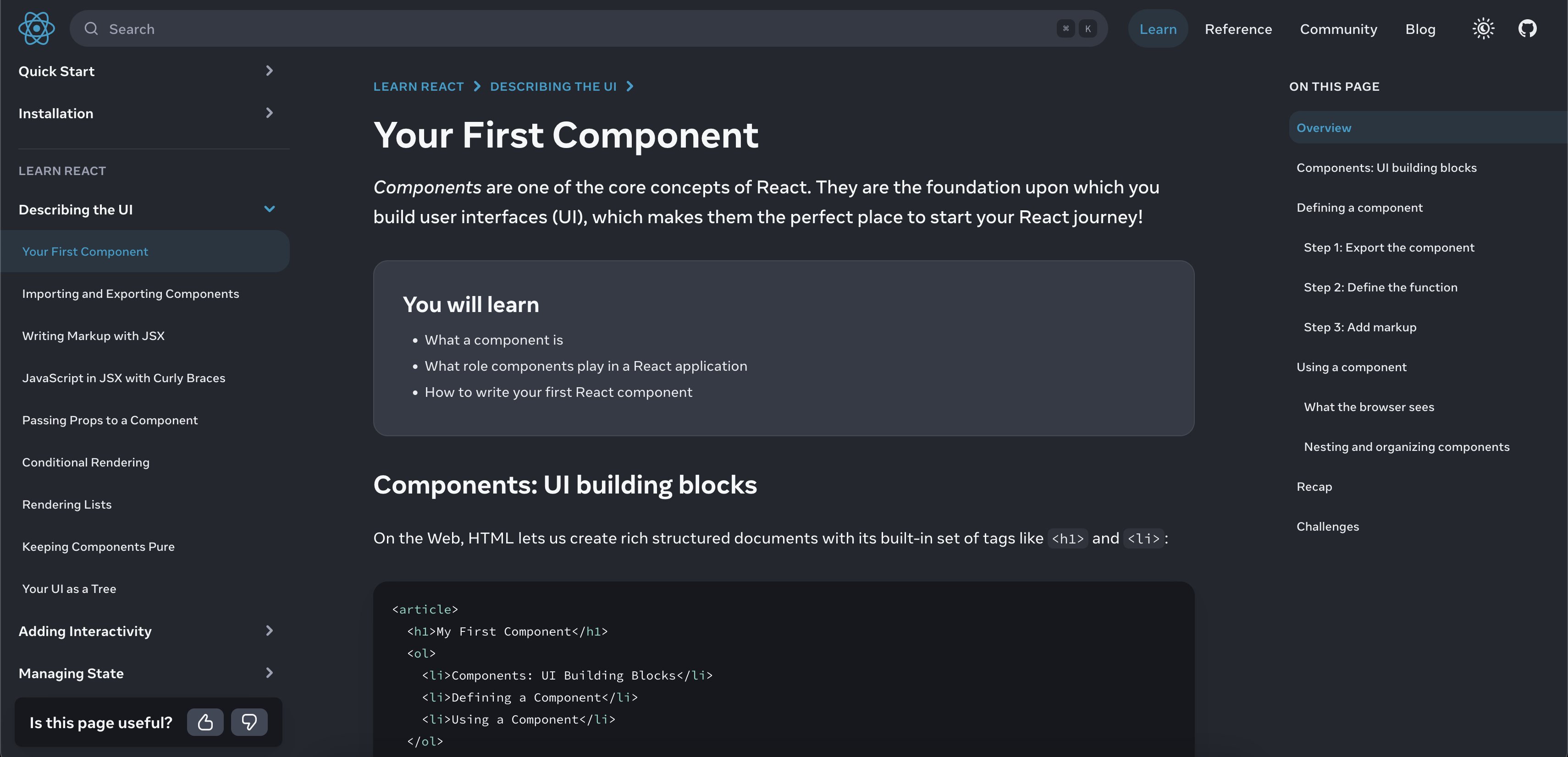
React’s tutorials are more structured around documentation whereas Svelte is structured around building projects
This may just be personal preference, but I loved how thought-through the learning process for Svelte is. It’s so beginner friendly.
You want to make a component that adds two numbers together?
<script>
let a = 0, b = 0;
</script>

<input type="number" bind:value={a} />
<input type="number" bind:value={b} />
<p>{a + b}</p>
Now switch to React:
import { useState } from 'react';

export default () => {
	const [a, setA] = useState(0);
	const [b, setB] = useState(0);

	return (
		<input type="number" value={a} onChange={(e) => setA(e.target.value)} />
		<input type="number" value={a} onChange={(e) => setB(e.target.value)} />
		<p>{parseInt(a) + parseInt(b)}</p>
	)
}
Goes without saying that the language of Svelte is highly readable.
The reason why I committed to a certain tech in the first place is because I picked the most popular tech at the time I was learning it (~8 years ago).
e.g., I picked MySQL because it’s a very popular database. If I get a bug or a strange error, I can always google it out.
— Tony Dinh 🎯 (@tdinh_me) June 20, 2024
Some hard fought lessons from Tony Dinh here. You just pick a framework and stick to it. No back and forth!
Now that I’ve locked in on my stack for the next decade, I’ll touch a bit upon the setup I use to build Rails+Svelte apps:
Inertia Rails Integration
rails new rails-inertia-svelteAdd the relevant gems:
bundle add inertia_rails
bundle add vite_rails
Install vite:
bundle exec vite installSetup front end libraries
The previous step will create the package.json file so you can then install the required npm packages:
npm install --save-dev @inertiajs/inertia
npm install --save-dev @inertiajs/svelte
npm install --save-dev @sveltejs/vite-plugin-svelte
npm install --save-dev svelte
To make sure package.json allows for modules,
"type": "module",


{
  "type": "module",
  "devDependencies": {
    "@inertiajs/inertia": "^0.11.1",
    "@inertiajs/svelte": "^1.2.0",
    "@sveltejs/vite-plugin-svelte": "^3.1.1",
    "vite": "^5.3.1",
    "vite-plugin-ruby": "^5.0.0"
  }
}
Configure Vite Plugin
Add the Vite Svelte plugin to the project by editing the vite.config.ts file (found in the project’s root). After editing it should look like the following:
import { defineConfig } from 'vite'
import RubyPlugin from 'vite-plugin-ruby'
import { svelte } from '@sveltejs/vite-plugin-svelte'

export default defineConfig({
  plugins: [
    RubyPlugin(),
    svelte(),
  ],
})
Next configure the vite.json file (located in the config folder) to point to the correct location for our entrypoint. The sourceCodeDir value needs to be frontend like so:
{
  "all": {
    "sourceCodeDir": "app/frontend",
    "watchAdditionalPaths": []
  },
In the next step we’ll create the entrypoint we refer to above.
Setup Rails Svelte entrypoint
This step was a bit different in the few places I found examples however this seems to be the accepted and most orthodox way of organising the files.
First create the application.js file:
mkdir -p app/frontend/entrypoints
touch app/frontend/entrypoints/application.js
The contents of application.js should be the following:
import { createInertiaApp } from '@inertiajs/svelte'

createInertiaApp({
  resolve: name => {
    const pages = import.meta.glob('../pages/**/*.svelte', { eager: true })
    return pages[`../pages/${name}.svelte`]
  },
  setup({ el, App, props }) {
    new App({ target: el, props })
  },
})
Next create a front end Svelte component as an example.
First create the Home.svelte file:
mkdir -p app/frontend/pages
touch app/frontend/pages/Home.svelte
Now add images under /public/assets/images/ folder. I’ve added a rickroll.gif for demonstration purposes.
Then add some HTML markup to the Home.svelte component:
<script>
    let src = "assets/images/rickroll.gif";
</script>

<img {src} alt="a random image" />
Generate Rails Code
To load our Home.svelte component we’ll need a Rails controller which we’ll create like so:
rails generate controller Home indexThen make sure the index method sends the correct response using the Inertia library:
class HomeController < ApplicationController
  def index
    render inertia: 'Home', props: {
      name: 'Inertia Rails'
    }
  end
end
To get the above to work on the main path edit the routes.rb file like so:
Rails.application.routes.draw do
  root 'home#index'
end
Final Steps
We’re almost done. In fact we have everything we need but this bit is to make it a bit simpler to run. Create a dev file in the bin folder and make it executable:
touch bin/dev
chmod +x bin/dev
Edit the newly created dev file and add the following bash code:
# !/usr/bin/env sh

if ! gem list foreman -i --silent; then
  echo "Installing foreman..."
  gem install foreman
fi

exec foreman start -f Procfile.dev "$@"
Finally create the Procfile.dev file which is referred to above:
touch Procfile.devAnd then add the following lines. The p flag is important and is what caught me out:
vite: bin/vite dev
web: bin/rails s -p 3000
And that’s it! Now you can run bin/dev from your terminal and you should see something like the following:

Inaugurating my first Svelte+Rails app with a rick roll meme
Read more
- Home is where the feeling of home residesreflections
- Notes on doing most good, doing some good, and living goodphilanthropy
- Notes on Londontravel
- 18 key ideas from reading Henrik Karlsson this monthwriting
- Venn-diagram based decision makingmathematics
- Co-creative loops are everywheremental-models
- Life lessons and hot takes from my 30slifestyle
- Building a skill for coherent science illustrationsscience
- My agentic engineering workflow (step by step)agentic-coding
- Hammock driven developmentagentic-coding
- Peculiar ways number three fits into our funny little brainsmental-models
- AI sandwich as a defacto principle for anything agentic engineering relatedagentic-coding
- Authority in the guise of evidencecritical-rationalism
- Map is not the territoryphilosophy
- Self hypnosis as a manifestation ritualmeditation
- Hegelian dialectic for structured reasoning with AI agentsphilosophy
- How I prepare for tough negotiations nowadaysnegotiation
- When should we steelthread somethingproduct-development
- Breadboarding, shaping, slicing, and steelthreading solutions with AI agentsproduct
- Healthy conflict in teams have a tipping pointteam-building
- How I deslopify AI writingwriting
- How I started building softwares with AI agents being non technicalagentic-coding
- Read raw transcriptswriting
- Legible and illegible tasks in organisationsproduct
- L2 Fat marker sketchesdesign
- Writing as moats for humanswriting
- Beauty of second degree probesdecision-making
- Boundary objects as the new prototypesprototyping
- One way door decisionsproduct
- Finished softwares should existproduct
- How I periodically rank my rough draftsobsidian
- Flipping questions on its headinterviewing
- Vibe writing maximswriting
- How I blog with Obsidian, Cloudflare, AstroJS, Githubwriting
- How I build greenfield apps with AI-assisted codingagentic-coding
- We have been scammed by the Gaussian distribution clubmathematics
- Classify incentive problems into stag hunts, and prisoners dilemmasgame-theory
- I was wrong about optimal stoppingmathematics
- Thinking like a shipmental-models
- Hyperpersonalised N=1 learningeducation
- New mediums for humans to complement superintelligenceagentic-coding
- Maxims for AI assisted codingagentic-coding
- Virtual bookshelvesaesthetics
- It's computational everythingtrends
- Public gardens, secret routesdigital-garden
- Git way of learning to codeagentic-coding
- Style Transfer in AI writingagentic-coding
- Understanding codebases without using codeagentic-coding
- Vibe coding with Cursoragentic-coding
- Virtuoso Guide for Personal Memory Systemsmemory
- Writing in Future Pastwriting
- Publish Originally, Syndicate Elsewhereblogging
- Poetic License of Designdesign
- Idea in the shower, testing before breakfastsoftware
- Technology and regulation have a dance of ice and firetechnology
- How I ship "stuff"software
- Writing is thinkingwriting
- Song of Shapes, Words and Pathscreativity
- How do we absorb ideas better?knowledge
- Read writers who operatewriting
- Brew your ideas lazilyideas
- Trees, Branches, Twigs and Leaves — Mental Models for Writingwriting
- Compound Interest of Private Noteswriting
- Conceptual Compression for LLMsagentic-coding
- Meta-analysis for contradictory research findingsdigital-health
- Proof of workproduct
- Gauging previous work of new joinees to the teamleadership
- Task management for product managersproduct
- Beauty of Zettelswriting
- Stitching React and Rails togetheragentic-coding
- Exploring "smart connections" for note takingwriting
- Deploying Home Cooked Apps with Railssoftware
- Repetitive Copypromptingwriting
- Questions to ask every decadejournalling
- Balancing work, time and focusproductivity
- Hyperlinks are like cashew nutswriting
- Brand treatments, Design Systems, Vibesdesign
- How to spot human writing on the internetwriting
- Can a thought be an algorithm?product
- Opportunity Harvestingcareers
- Everything is a prioritisation problemproduct
- Nowlifestyle
- How I do product roastsproduct
- In-person vision transmissionproduct
- How might we help children invent for social good?social-design
- The meeting before the meetingmeetings
- Design that's so bad it's actually gooddesign
- Lessons learnt interview prepping for product rolesinterviewing
- Obsessing over personal websitessoftware
- English is the hot new programming languagesoftware
- Better way to think about conflictsrisk-management
- The role of taste in building productsdesign
- Dear enterprises, we're tired of your subscriptionssoftware
- Products need not be user centereddesign
- World's most ancient public health problemsoftware
- Pluginisation of Modern Softwaredesign
- Let's make every work 'strategic'consulting
- Making Nielsen's heuristics more digestibledesign
- Startups are a fertile ground for risk takingentrepreneurship
- Insights are not just a salad of factsdesign
- Minimum Lovable Productproduct
- Methods are lifejackets not straight jacketsmethodology
- How to arrive at on-brand colours?design
- Minto principle for writing memoswriting
- Importance of Whytask-management
- Quality Ideas Trump Executionsoftware
- Why I prefer indie softwareslifestyle
- Use code only if no code failscode
- Self Marketing
- Personal Observation Techniquesdesign
- Design is a confusing worddesign
- A Primer to Service Design Blueprintsdesign
- Rapid Journey Prototypingdesign
- Visualise detailed file structures on CLIcli
- Do's and Don'ts of User Researchdesign
- Design Manifestodesign
- Complex project management for productproducts
- How might we enable patients and caregivers to overcome preventable health conditions?digital-health
- Pedagogy of the Uncharted — What for, and Where to?education
- Future of Equity with Ludovick Petersinterviewing
- Future of Ageing with Mehdi Yacoubiinterviewing
- Future of Tacit knowledge with Celeste Volpiinterviewing
- Future of Mental Health with Kavya Raointerviewing
- Future of unschooling with Che Vanniinterviewing
- Future of Rural Innovation with Thabiso Blak Mashabainterviewing
- Future of work with Laetitia Vitaudinterviewing
- How might we prevent acquired infections in hospitals?digital-health
- The why to endure any howentrepreneurship
- Design education amidst social tribulationsdesign
- How might we assist deafblind runners to navigate?social-design